Security Controls Overview
Diagram: security-controls-overview.svg
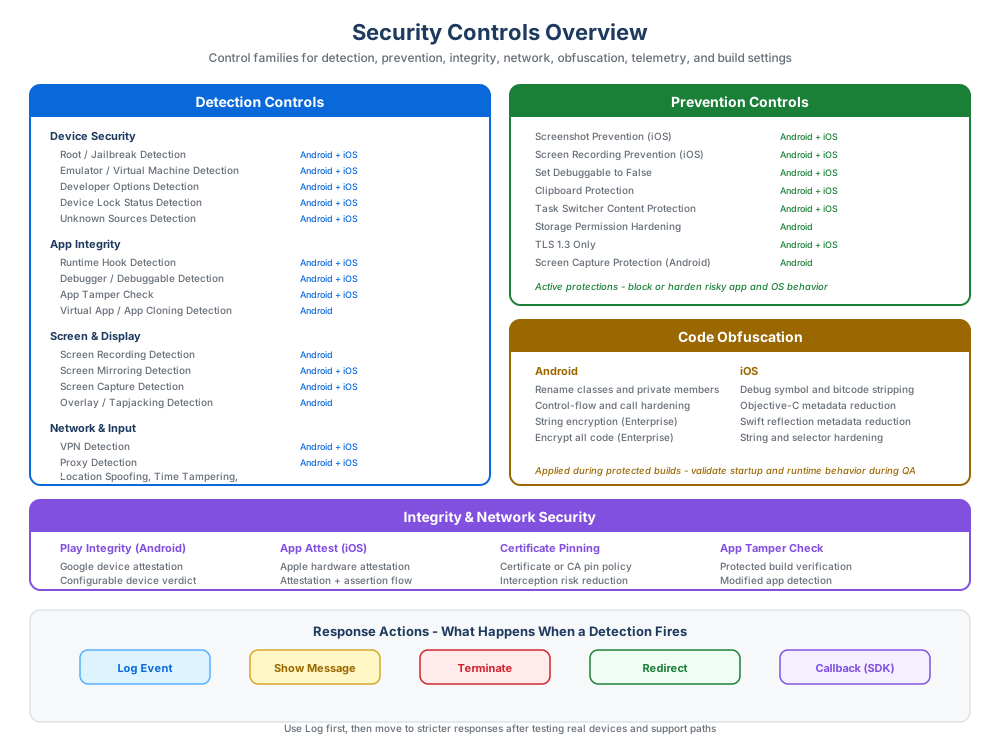
Overview
AppTego protects mobile applications with layered controls that run during the protected build process and at runtime on end-user devices. Controls can detect hostile environments, prevent risky OS behaviors, harden app binaries, validate app integrity, and strengthen network trust.
Controls are configured in the AppTego Portal or through the API. Most build-time and runtime capabilities are embedded into the protected app when you create a new build. Enterprise live configuration can update supported runtime settings without rebuilding when the app was built with live updates enabled.
The best configuration is not the one with the most toggles enabled. It is the one that fits your app's data sensitivity, user population, distribution model, support process, and release maturity.
This overview is a planning guide. For exact platform support, minimum plan, configuration fields, and rebuild requirements, use the linked control reference pages as the source of truth.
How To Choose Controls
| Decision | Guidance |
|---|---|
| Start with risk | Identify the workflows, data, and attack scenarios that matter most for your app. |
| Separate detection from enforcement | Use Log first when you need evidence before blocking users. |
| Match response to remediation | Use Message or Redirect when a legitimate user can fix the condition. |
| Validate on real devices | Test protected builds on physical devices, managed devices, and representative OS versions. |
| Promote gradually | Move changes through Development, Staging, and Production with release notes and build IDs. |
| Monitor after release | Use dashboard data, device logs, audit logs, and support tickets to tune policy. |
Control Categories
| Category | Purpose | Examples |
|---|---|---|
| Detection | Identify risky device, app, runtime, network, or install conditions. | Root/jailbreak, emulator, debugger, hook, VPN, proxy, screen capture. |
| Prevention | Block or restrict risky behavior directly. | Screen capture protection, clipboard protection, storage permission hardening, task switcher protection. |
| Integrity and attestation | Verify that the app and device posture are trustworthy. | App tamper detection, Play Integrity, App Attest. |
| Network protection | Strengthen transport security and certificate trust. | Certificate pinning, cleartext prevention, TLS enforcement. |
| Code obfuscation | Make reverse engineering and binary analysis harder. | Class renaming, string protection, control-flow hardening, symbol stripping. |
| Privacy and telemetry | Control security context collected for monitoring and response. | IP address, device information, location, configuration refresh. |
| Build configuration | Change the protected artifact that AppTego creates. | Emulator/simulator architecture support for QA and CI. |
For the complete customer-facing inventory, see the Individual Control Reference.
How Detection Responses Work
Detection controls trigger a response when a threat condition is found.
| Response | Behavior | Recommended use |
|---|---|---|
| Log | Record the event and allow the app to continue. | First rollout, monitoring, tuning, and false-positive analysis. |
| Message | Show an in-app message before the configured follow-up action. | User-friendly enforcement with clear remediation guidance. |
| Redirect | Send the user to a support, update, compliance, or store URL. | Recoverable policy failures or required upgrade paths. |
| Terminate | Block continued app use for the triggered condition. | Critical threats where the app must not continue. |
Start new detections in Log mode unless you already have a validated blocking policy. Move to stricter actions after QA and pilot testing confirm expected behavior.
How Prevention Controls Work
Prevention controls harden the app or device interaction directly. They are usually configured as on/off settings and do not require a response action. Examples include preventing screenshots, protecting app switcher previews, restricting clipboard use, blocking cleartext traffic, or hardening local storage.
Because most prevention behavior is embedded into the protected binary, plan to rebuild and retest after changing prevention settings.
Some Enterprise runtime settings can be updated through live configuration when the protected app was built with that support. Build-time controls, new control integrations, architecture settings, and obfuscation changes still require a new protected build.
Platform Guidance
| Area | Android | iOS |
|---|---|---|
| Device integrity | Root, emulator, developer options, app cloning, virtual environments, Play Integrity. | Jailbreak, simulator, developer mode, App Attest, memory tamper. |
| Runtime analysis | Debugger, hook, overlay, accessibility, USB, debuggable posture. | Debugger, hooking, memory tamper, debuggable posture. |
| Screen security | Screenshot, screen recording, screen mirroring, task switcher protection. | Screenshot, screen recording, screen mirroring, task switcher protection. |
| Network posture | Proxy, VPN, certificate pinning, cleartext prevention, TLS enforcement. | Proxy, VPN, certificate pinning, TLS enforcement. |
| Data leakage | Clipboard, autofill, backup, storage, exported components, PendingIntent hardening. | Clipboard, backup, file sharing, keychain accessibility, keyboard cache, Spotlight/Handoff, system sharing. |
| Obfuscation | Android binary and bytecode hardening controls. | Symbol, metadata, selector, string, and bitcode hardening controls. |
| Build configuration | Optional x86 architecture support for emulator, Chromebook, or x86 Android testing. | Optional simulator architecture support for QA and CI. |
Specific platform minimums and limitations are documented on individual control pages.
Recommended Rollout
- Enable baseline detections in Log mode.
- Protect a QA build and test on physical devices.
- Review security dashboard and device logs for unexpected detections.
- Add user-friendly Message or Redirect responses for recoverable conditions.
- Use Terminate only for conditions that must block app use.
- Add prevention controls for sensitive screens, data entry, local storage, and network transport.
- Enable obfuscation and integrity controls for release builds.
- Promote configuration from Development to Staging to Production after validation.
What To Document Internally
For each production rollout, keep an internal record of:
- App version and platform.
- AppTego build job ID.
- Configuration environment and promotion date.
- Controls enabled or changed.
- Expected user-facing behavior.
- QA devices and OS versions tested.
- Support guidance for legitimate users affected by enforcement.
Detailed Guides
- Detection Controls
- Prevention Controls
- App Integrity
- Network Protection
- Certificate Pinning
- Code Obfuscation
- Privacy And Telemetry
- Build Configuration
- Individual Control Reference
Automatic Build Hardening
Depending on plan and selected settings, protected builds may also receive automatic hardening during AppTego processing. This can include stronger runtime packaging, protected configuration handling, binary metadata reduction, anti-removal safeguards, and control-specific integration work.
These protections are applied by AppTego as part of the build. Rebuild an existing app after changing plan level or enabling new build-time controls so the protected artifact receives the updated protection set.