Configuring Security Controls
Overview
Security controls are grouped into portal categories. Each control can be enabled or disabled by environment, and response controls can also define what happens when a protected app reports a security condition.
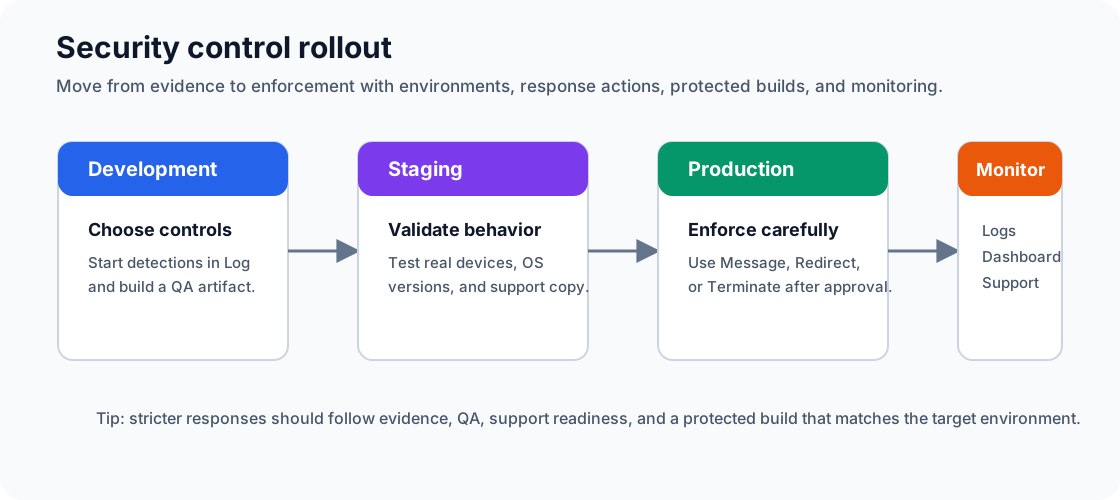
Treat configuration changes like release changes. Start with observation, validate on representative devices, then promote stricter responses only after your team understands the effect.
Control Areas
Prevention Controls
Prevention controls are active protections that block or harden specific behaviors. Most are simple on/off settings and are included in the next protected build that uses the selected environment.
| Control | Control ID | Minimum plan | Platform | Type |
|---|---|---|---|---|
| Android Screen Capture Protection | AndroidScreenCaptureProtection | Free | Android API 21+ | On/off |
| Hide Task Switcher Content | TaskSwitcherBlurPrevention | Team | Android, iOS | On/off |
| Screenshot Prevention | ScreenshotPrevention | Team | iOS 11+ | On/off |
| Screen Recording Prevention | ScreenRecordingPrevention | Team | iOS 11+ | On/off |
| Storage Permission Hardening | StoragePermissionHardeningPrevention | Team | Android | On/off |
| Storage Encryption | StorageEncryptionPrevention | Team | iOS | On/off |
| Keychain Accessibility Hardening | KeychainAccessibilityPrevention | Team | iOS | On/off |
| Disable Android Backup | BackupPrevention | Team | Android | On/off |
| iOS Backup Protection | BackupProtection | Team | iOS | On/off |
| File Sharing Prevention | FileSharingPrevention | Team | iOS | On/off |
| Clipboard Protection | ClipboardProtectionPrevention | Team | Android, iOS 10+ | On/off |
| Spotlight And Handoff Suppression | SpotlightIndexingPrevention | Team | iOS | On/off |
| System Sharing Suppression | SystemSharingPrevention | Team | iOS | On/off |
| Keyboard Cache Prevention | KeyboardCachePrevention | Team | iOS | On/off |
| Autofill Suggestion Prevention | AutofillSuggestionPrevention | Team | Android | On/off |
| Disable Debuggable Builds | DebuggablePrevention | Team | Android, iOS | On/off |
| Overlay Prevention | OverlayPrevention | Free | Android | On/off |
| WebView Hardening | WebViewHardeningPrevention | Team | Android, iOS 10+ | On/off |
| Exported Component Lockdown | ExportedComponentsPrevention | Team | Android | On/off |
| Task Hijacking Prevention | TaskHijackingPrevention | Team | Android | On/off |
| Immutable PendingIntent Enforcement | ImmutablePendingIntentPrevention | Team | Android | On/off |
See Prevention Controls Reference for detailed behavior, rollout, and platform guidance.
Detection And Response Controls
Detection controls identify security conditions at runtime. Each control uses one of the response actions described later in this guide.
| Control | Control ID | Minimum plan | Platform |
|---|---|---|---|
| Root Detection | RootDetectionResponse | Free | Android |
| Jailbreak Detection | JailbreakDetectionResponse | Free | iOS |
| Developer Options Detection | DeveloperOptionsDetectionResponse | Team | Android, iOS |
| Emulator Detection | EmulatorDetectionResponse | Team | Android, iOS |
| Virtual App Detection | VirtualAppDetectionResponse | Team | Android |
| App Cloning Detection | AppCloningDetectionResponse | Team | Android |
| Debuggable Detection | DebuggableDetectionResponse | Team | Android, iOS |
| Debugger Detection | DebuggerDetectionResponse | Team | iOS |
| Hook Detection | HookDetectionResponse | Team | Android |
| Hooking Detection | HookingDetectionResponse | Team | iOS |
| Memory Tamper Detection | MemoryTamperDetectionResponse | Team | iOS |
| USB Connection Detection | UsbConnectionDetectionResponse | Team | Android |
| VPN Detection | VpnDetectionResponse | Team | Android, iOS |
| Proxy Usage Detection | ProxyUsageDetectionResponse | Team | Android, iOS |
| Time Tampering Detection | TimeTamperingDetectionResponse | Team | Android, iOS |
| Location Spoofing Detection | LocationSpoofingDetectionResponse | Team | Android, iOS |
| Overlay Detection | OverlayDetectionResponse | Team | Android |
| Screen Capture Detection | ScreenCaptureDetectionResponse | Team | Android API 34+, iOS |
| Screen Recording Detection | ScreenRecordingDetectionResponse | Team | Android |
| Screen Mirroring Detection | ScreenMirroringDetectionResponse | Team | Android, iOS |
| Accessibility Service Detection | AccessibilityServiceDetectionResponse | Team | Android |
| Third-Party Keyboard Detection | ThirdPartyKeyboardDetectionResponse | Team | Android, iOS |
| Google Play Integrity | PlayIntegrityCheck | Enterprise | Android |
| Apple App Attest | AppAttestCheck | Enterprise | iOS |
| App Tamper Detection | AppTamperCheck | Team | Android, iOS |
| Device Lock Detection | DeviceLockDetectionResponse | Team | Android, iOS |
| Unknown Source Detection | UnknownSourcesDetectionResponse | Team | Android, iOS |
Connection Controls
Connection controls are configured in Connection Settings. See Connection Settings for certificate management details.
| Control | Control ID | Minimum plan | Platform | Type |
|---|---|---|---|---|
| Require TLS 1.3 | TLS13OnlyPrevention | Enterprise | Android API 29+, iOS 13+ | On/off |
| Block Cleartext Traffic | CleartextPrevention | Enterprise | Android | On/off |
| Certificate Pinning | CertificatePinning | Enterprise | Android, iOS | Response action |
| Certificate Transparency Enforcement | CertificateTransparencyPrevention | Enterprise | Android | On/off |
Additional Features
Additional features are configured in Device Settings. See Device Settings for telemetry storage and live configuration behavior.
| Feature | Control ID | Minimum plan | Platform | Type |
|---|---|---|---|---|
| Store IP Addresses | StoreIPAddress | Enterprise | Android, iOS | On/off |
| Store Approximate Location | StoreLocation | Enterprise | Android, iOS | On/off |
| Store Device Information | StoreDeviceInformation | Enterprise | Android, iOS | On/off |
| Enforce Latest Configuration | EnforceLatestConfiguration | Enterprise | Android, iOS | On/off |
| Check For Configuration Updates | ConfigurationUpdateFrequency | Enterprise | Android, iOS | On/off |
| Enforce App Updates | EnforceNew | Team | Android, iOS | Response action |
Code Obfuscation
Code obfuscation is applied during protected build creation. Available behavior depends on plan, platform, and selected obfuscation profile. See Code Obfuscation for the detailed options.
Response Actions
Response controls can use one of four actions. The portal labels are Log, Terminate, Message, and Redirect.
Log
The app continues running. When device logging is available and configured, the event can appear in Device Logs or dashboard views.
Use Log for first rollout, monitoring, false-positive review, and policy tuning.
Terminate
The app blocks continued use when the detection triggers. Use Terminate only for high-confidence conditions where the app must not continue.
For user-facing enforcement, prefer Message or Redirect when users need remediation guidance.
Message
The app displays an in-app message using configured text and button behavior. Use Message when users need context before access is limited.
Message configuration supports:
| Field | Description |
|---|---|
title | Dialog title. |
message | Dialog body text. |
buttons | Button labels. |
actions | Per-button actions. |
redirects | Redirect URLs for buttons whose action is redirect. |
If a message button uses a redirect action, provide a corresponding redirect URL. Write custom messages in the languages your app supports, and test layout on small screens before Production rollout.
Message And Configuration Limits
Configuration limits are measured in UTF-8 bytes. For JSON configuration limits, the saved compact JSON payload counts, including field names, punctuation, and configured text.
| Item | Limit |
|---|---|
| Message title | 8 KB (8,192 bytes) |
| Message body | 16 KB (16,384 bytes) |
| Each message button label | 8 KB (8,192 bytes) |
| Saved message response configuration | 9 MB (9,437,184 bytes) |
| Complete saved environment configuration | 9 MB (9,437,184 bytes) |
| App Integrity response configuration | 9 MB (9,437,184 bytes) |
If a configuration exceeds these limits, the portal rejects the save and shows an error before the change is used for a build or live configuration push.
Redirect
Redirect opens a specified URL and then blocks continued use according to platform behavior. Use it when the next step is outside the app, such as an app store page, support article, or compliance workflow.
Redirect configuration requires exactly one URL for the redirect action. The portal validates URL format before saving.
Configuring a Response Control
- Select the correct tenant and environment.
- Navigate to the appropriate control category in the sidebar.
- Find the control you want to configure.
- Toggle the control to Enabled.
- Select the response action: Log, Terminate, Message, or Redirect.
- If using Message, configure title, body, buttons, button actions, and any needed redirect URLs.
- If using Redirect, enter the destination URL.
- Select Save.
- Protect and test a build before promoting the change.
Each response control card shows an enable switch, an action selector, action-specific configuration fields, and platform support details.
Saving And Applying Configuration
- Make changes in the selected environment: Development, Staging, or Production.
- Select Save to store the current state of controls, toggles, and response actions for that environment.
- Build-time changes apply to the next protected build that uses the environment.
- Supported live configuration changes can be pushed to already-deployed apps when the app was built with live configuration enabled.
Saving does not automatically promote changes to other environments.
Configuration Promotion
To promote a tested configuration from one environment to another:
- Navigate to the source environment, such as Development.
- Select Promote.
- Promotion flow is Development -> Staging -> Production.
- Confirm the promotion. The target environment's configuration is overwritten.
Promotion Best Practices
- Test in Development first, usually with Log responses.
- Promote to Staging and validate with QA or pilot devices.
- Promote to Production only after protected-app testing.
- Keep release notes with configuration changes and build job IDs.
- Use the Security Dashboard and Device Logs to monitor behavior after promotion.
Live Configuration Push (Enterprise)
Enterprise tenants can push supported configuration changes to already-deployed apps when live configuration was enabled before release:
- Save the configuration in the desired environment.
- Open Device Settings.
- Select Push Latest Live Configuration.
- Deployed apps receive the supported configuration update according to runtime behavior.
Build-time controls, structural changes, and many prevention settings still require a new protected build.