AppTego - Mobile Application Security Platform
What Is AppTego?
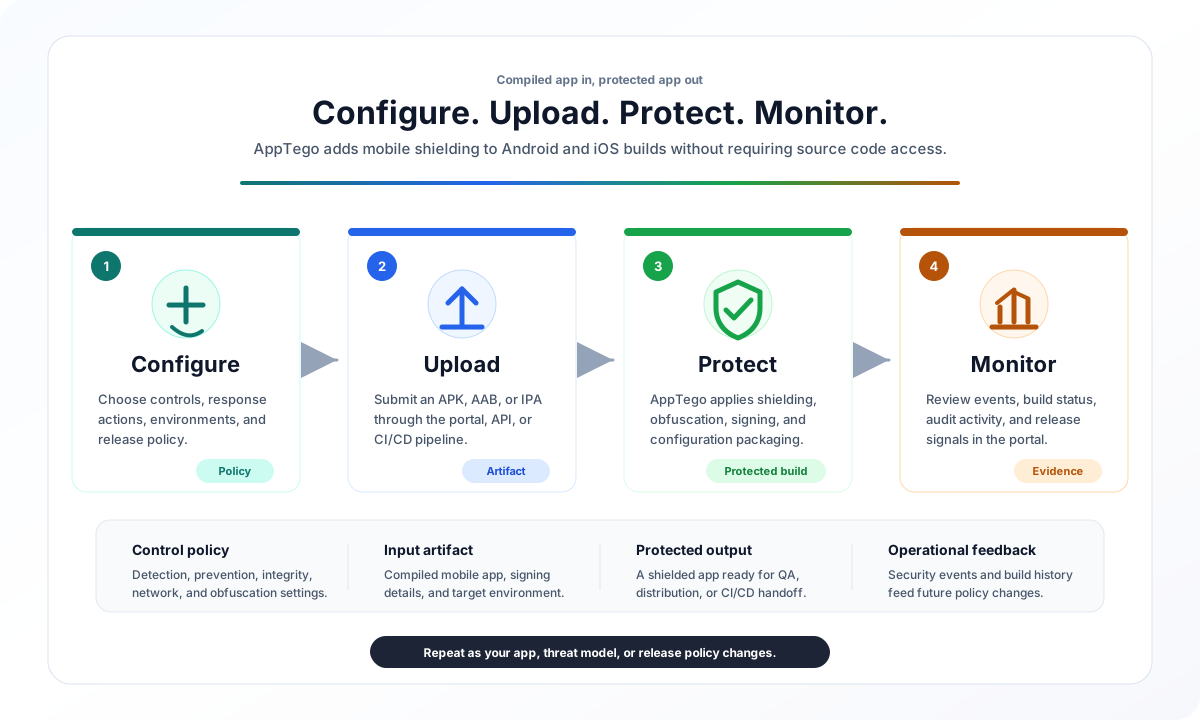
AppTego protects Android and iOS apps from runtime threats, tampering, reverse engineering, unsafe device conditions, and network interception. In Standard Mode, it does this without requiring source code changes: you upload a compiled APK, AAB, or IPA, select a protection configuration, and download a protected app for QA or release.
The platform is built for teams that need mobile security to fit into real release workflows. You can start manually in the portal, then move the same protection process into CI/CD or API-driven automation when you are ready.
Who AppTego Is For
- Mobile development teams that need protection without disrupting app architecture.
- Security engineers who want runtime visibility and enforceable mobile policy.
- Release and DevOps teams that need repeatable protected builds in CI/CD.
- Compliance teams that need evidence of app hardening, auditability, and release controls.
- Organizations distributing sensitive apps such as banking, payments, healthcare, government, workforce, or enterprise MDM apps.
What Problems AppTego Solves
| Risk | What can go wrong | How AppTego helps |
|---|---|---|
| Reverse engineering | Attackers inspect app structure, business logic, strings, and symbols. | Obfuscation, string protection, symbol reduction, and build hardening make analysis more difficult. |
| Runtime tampering | Modified apps, injected code, or altered runtime behavior can change how the app works. | Integrity checks and runtime detections help identify tampered or untrusted conditions. |
| Unsafe device posture | Rooted, jailbroken, emulated, cloned, or otherwise risky environments can weaken trust assumptions. | Device and runtime detections can log, message, redirect, or terminate based on your policy. |
| Debugging and instrumentation | Runtime inspection can observe or alter app behavior. | Debugger, hooking, memory, and analysis detections provide visibility and enforcement options. |
| Network interception | Traffic inspection or weakened transport policy can expose sensitive sessions. | Certificate pinning, TLS policy, cleartext prevention, and network posture detections strengthen trust. |
| Data exposure through OS surfaces | Screenshots, recordings, clipboard, keyboard, backups, or sharing surfaces can leak sensitive data. | Prevention controls reduce common leakage paths for sensitive mobile workflows. |
How It Works
AppTego supports two integration models. Start with Standard Mode unless you have a specific source-level integration requirement.
Standard Mode: Automatic Protection
Standard Mode is the default path. No source code changes are required, and the same protected-build process can be used from the portal, CI/CD integrations, or the Automation API.
| Stage | What you do | What AppTego does |
|---|---|---|
| Configure | Choose controls, response actions, environments, and signing strategy. | Stores a reusable protection policy for portal, API, and CI/CD workflows. |
| Upload | Submit a compiled APK, AAB, or IPA through the portal, Automation API, or CI/CD integrations. | Validates the artifact, starts a build record, and prepares the protected-build environment. |
| Protect | Wait for the build to complete, then download the protected output. | Applies selected protection, packaging, and signing behavior to create a protected app. |
| Validate | Install the protected app on representative devices and test critical flows. | Gives your team confidence before you promote configuration or release externally. |
| Monitor | Review build history, device events, audit activity, and dashboard signals. | Helps tune controls as your rollout expands. |
Library Mode: Source-Level Integration
Enterprise teams that need programmatic runtime control can embed the MobileDefender SDK directly in source code:
- Request a custom library build from the portal
- Add the AAR (Android) or framework (iOS) to your project
- Initialize the SDK and register detection callbacks in your code
- Build and distribute your app normally
Library Mode is best when your app needs custom callbacks, source-level enforcement logic, or a release process where your own build pipeline must produce the final artifact. See Library Mode for setup instructions.
First Protected Build
Before You Begin
- A compiled mobile app:
.apk,.aab, or.ipa. - Access to an AppTego tenant.
- A real device for validation.
- A decision on signing: temporary test signing for QA, or your own signing identity for production.
Recommended First Build Flow
Step 1: Sign in to the portal
Open the AppTego Portal and sign in with email/password, Google, Apple, or your organization's SSO.
Step 2: Select or create a tenant
If this is your first login, create a tenant. A tenant is your workspace for apps, users, builds, configuration, logs, and subscription settings.
Step 3: Configure a safe baseline
Go to the control configuration area and enable a small baseline:
- Start with detection controls in Log mode so events are visible without blocking users.
- Add low-risk prevention controls only where the app experience is well understood.
- Add obfuscation, network, and integrity controls after your first protected QA build behaves as expected.
Start gently. A good first build should prove that protection can be applied, installed, and tested before you enforce stricter policy.
Step 4: Upload the app
Go to Application Builds -> Upload:
- Select your platform (Android or iOS)
- Choose the configuration environment (production, staging, or development)
- Select your compiled app file
- Click Upload
Build time depends on app size, platform, signing, and selected controls. The build list shows live status updates.
Build Process Stages
The Application Builds view shows the live status of your build. Each job moves through these stages:
| Stage | What it means | What to do |
|---|---|---|
queued | AppTego accepted the upload and is waiting for build capacity. | No action needed. |
launching worker | A protected-build environment is starting. | No action needed. |
downloading | The build environment is retrieving the uploaded app, selected configuration, and signing inputs. | No action needed. |
building | AppTego is applying protection and producing the output artifact. | Wait for completion; larger apps can take longer. |
completed | The protected app is ready to download. | Download and test on real devices. |
failed | The build could not complete. | Review the error message and see Troubleshooting. |
Large apps, native-heavy apps, and iOS builds may spend more time in the building stage.
Step 5: Download and validate
When the build completes, download the protected app. Install it on real devices and run the same smoke tests you use for release candidates: launch, login, critical workflows, offline behavior, network calls, and any screens affected by prevention controls.
Step 6: Distribute after signoff
After QA approval, distribute the protected artifact through your normal channel:
- Google Play or Apple App Store.
- Enterprise MDM such as Intune, Jamf, or MobileIron.
- Internal distribution or controlled sideloading.
- Firebase App Distribution, TestFlight, or a similar QA channel.
Key Capabilities
Threat Detection (27 Controls)
Detection controls continuously monitor the device and app runtime. When a threat is detected, the configured action fires:
- Report — silently logs the event to the security dashboard
- Block — terminates the app with a default message on Android and displays a blank screen on iOS.
- Custom Message — shows a configurable message to the user before terminating
| Category | Controls | Platforms |
|---|---|---|
| Device Integrity | Root detection, jailbreak detection, device attestation (Play Integrity / App Attest) | Android, iOS |
| Runtime Threats | Debugger detection, hooking framework detection, and method swizzling detection | Android, iOS |
| Environment | Emulator/simulator detection, virtual environment detection | Android, iOS |
| Screen Security | Screen capture detection, screen recording detection, screen mirroring detection | Android, iOS |
| Network | VPN detection, proxy detection, time tampering, and location spoofing | Android, iOS |
| App Integrity | Binary tampering detection, signature verification, checksum validation | Android, iOS |
| Input | Third-party keyboard and accessibility-service detection | Android, iOS |
See Detection Controls for the full reference.
Active Prevention (20 Controls)
Prevention controls actively block specific behaviors at the OS level. The table below shows common examples; use the Prevention Controls Reference for the full catalog.
| Control | Description | Platforms |
|---|---|---|
| Screenshot prevention | Applies iOS visual privacy protections for screenshots and related capture surfaces | iOS |
| Screen recording prevention | Displays a privacy screen during iOS recording and casting | iOS |
| Clipboard protection | Blocks protected app content from being copied to the system clipboard | Android, iOS |
| Storage permission hardening | Restricts Android internal files and SharedPreferences permissions | Android |
| Storage encryption | Applies iOS Data Protection to supported local app data | iOS |
| Android screen capture protection | Blocks screenshots, recordings, task switcher previews, and unsafe external display | Android |
| Task switcher blur | Blurs or blanks app preview in the recent apps switcher | Android, iOS |
| TLS 1.3 enforcement | Forces minimum TLS version for all network connections | Android, iOS |
| Set debuggable to false | Removes Android debuggable posture and prevents debugger attachment where supported | Android, iOS |
See Prevention Controls for the full reference.
Code Obfuscation (Team+)
Obfuscation transforms your app's compiled code to resist reverse engineering:
- Class name obfuscation — renames classes to randomized identifiers
- String encryption — encrypts hardcoded strings, decrypted only at runtime (Enterprise)
- Symbol stripping — removes debug symbols, function names, and metadata
- Path randomization — obscures package structure and file paths
See Code Obfuscation for details.
Certificate Pinning (Enterprise)
Pin TLS certificates to specific domains to prevent man-in-the-middle attacks:
- Configure domain + SHA-256 SPKI hash pairs through the portal
- Support for backup pins for certificate rotation
- Trusted root CA list management
See Certificate Pinning for setup instructions.
Integration Options
AppTego can start as a manual portal workflow and mature into release automation.
Web Portal
Use the browser-based AppTego Portal when you are evaluating AppTego, configuring a tenant, running manual QA builds, or reviewing dashboard and log data.
CI/CD Integration
Use a first-party integration when protected builds should be produced automatically after your normal mobile build step:
- GitHub Actions —
apptego-mobile-protectaction for GitHub workflows - CircleCI —
apptego/mobile-protectorb - Any CI system — use the Automation API directly with
curlor scripts
Management API
Use the Management API when internal tooling needs to inspect configuration, manage builds, administer users, query logs, or integrate AppTego data into dashboards and compliance workflows.
SDK / Library Mode (Enterprise)
Use Library Mode when your app needs source-level callbacks, custom reactions to detections, or a release process where your own build pipeline must produce the final protected binary.
Supported Platforms
| Platform | File Types | Minimum OS Version | Architecture |
|---|---|---|---|
| Android | APK, AAB | Android 8.0 (API 26) | arm64-v8a, armeabi-v7a |
| iOS | IPA | iOS 13.0+ | arm64 |
Tested with 15+ Frameworks
AppTego works with apps built using any framework — it operates on compiled binaries, so the build toolchain doesn't matter:
| Category | Frameworks |
|---|---|
| Native | Kotlin, Java (Android), Swift, Objective-C (iOS) |
| Cross-platform | React Native, Flutter, Kotlin Multiplatform (KMP), .NET MAUI |
| Hybrid | Ionic/Capacitor, Cordova |
| Game engines | Unity, Unreal Engine, Godot, Cocos2d-x, LibGDX, MonoGame, Phaser |
Subscription Plans
| Feature | Free | Team | Enterprise |
|---|---|---|---|
| Concurrent builds | 1 | 2 | 5 |
| Detection controls | ✅ (Very Limited) | ✅ | ✅ |
| Prevention controls | ✅ (Very Limited) | ✅ | ✅ |
| Code obfuscation | — | ✅ | ✅ |
| Certificate pinning | — | — | ✅ |
| Connection settings | — | ✅ | ✅ |
| Code signing | — | ✅ | ✅ |
| User management & roles | — | ✅ | ✅ |
| Support tickets | — | ✅ | ✅ |
| API tokens & automation | — | ✅ | ✅ |
| Custom messages | — | ✅ | ✅ |
| Config promotion (dev → staging → prod) | — | ✅ | ✅ |
| AI-powered search & help | — | ✅ | ✅ |
| Live configuration push | — | — | ✅ |
| Audit logs | — | — | ✅ |
| Device logs & analytics | — | — | ✅ |
| App integrity monitoring | — | — | ✅ |
| Custom library / Library Mode (BYOA) | — | — | ✅ |
| String encryption | — | — | ✅ |
| SAML SSO | — | — | ✅ |
| Real-time security dashboard | — | — | ✅ |
Choosing a Plan
- Free — Ideal for evaluation. Protect one app at a time with core detection and prevention controls.
- Team — For development teams. Adds obfuscation, code signing, CI/CD automation, multi-user collaboration, and support.
- Enterprise — For organizations with compliance requirements. Adds certificate pinning, real-time monitoring, audit trails, device-level analytics, SAML SSO, live config push, and custom SDK builds.
Upgrade at any time from the portal under Settings.
Architecture Overview
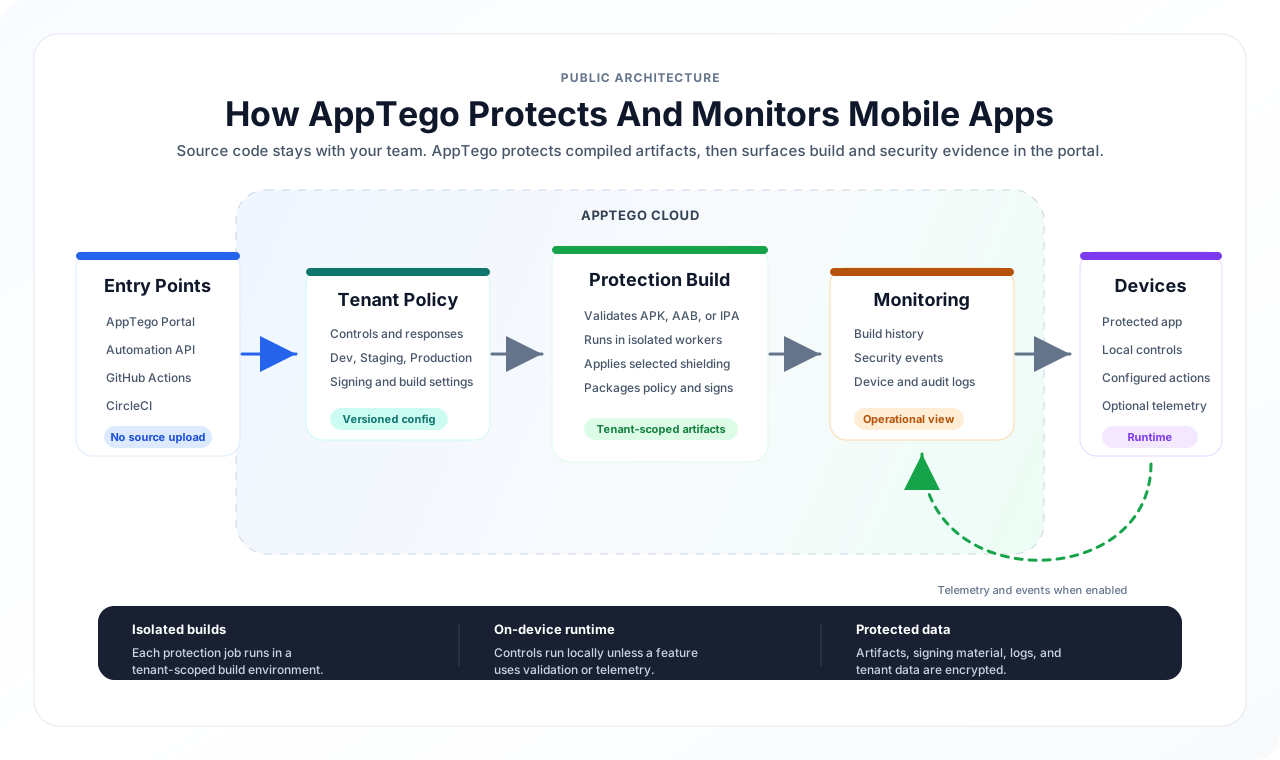
The architecture is designed around compiled-artifact protection. Teams configure policy in AppTego, upload an APK, AAB, or IPA through the portal, API, or CI/CD, and receive a protected app for testing and release.
Builds run in isolated AppTego environments. Embedded runtime controls execute on device unless a specific feature uses service validation or telemetry. Build history, audit logs, device events, and dashboard views help teams monitor the release and tune future configurations.
App artifacts, signing material, tenant configuration, logs, and platform data are protected in transit and at rest.
Frequently Asked Questions
Will protection break my app?
The protected app is intended to behave like the original app with the selected protections active. Validate every release candidate on real devices, especially when enabling prevention, networking, signing, or obfuscation features. If you encounter an issue, see Troubleshooting or contact support.
How long does a build take?
Build time depends on platform, app size, native libraries, signing, and selected protection options. Small builds may finish quickly; larger or more complex apps can take longer.
Can I protect apps built with React Native / Flutter / Unity?
Yes. AppTego works with any framework because it operates on the compiled binary, not source code.
What happens when a threat is detected?
You choose the response per detection control. Common rollout stages are Log for observation, Message or Redirect for user-friendly remediation, and Terminate for conditions where the app should not continue.
Can I update security settings without rebuilding?
Enterprise tenants can use Live Configuration Push for supported runtime settings when the app was built with live updates enabled. Structural changes, build-time protection, and many prevention settings require a new protected build.
Is there a size limit for uploads?
Hard limits are set in line with Apple App Store and Google Play requirements. Large files are handled via multipart upload.
How do I integrate AppTego into my CI/CD pipeline?
Use the GitHub Action, CircleCI Orb, or call the Automation API directly from any CI system.
Next Steps
| Goal | Guide |
|---|---|
| Explore the portal UI | Navigating the Portal |
| Protect your first app | Uploading Apps |
| Understand all controls | Security Controls Reference |
| Set up CI/CD automation | GitHub Actions · CircleCI |
| Use the API programmatically | Automation API · Management API |
| Embed the SDK in your code | Library Mode |
| Configure team access | User Management |
| Set up SSO | SAML SSO |